Before we begin
This guide assumes;
You already have Shizuku started and running properly. If it isn't, go and start it.
Termux is installed from F-Droid. Not Play Store.
The com.ea.games.r3_row folder unpacked under your Downloads folder in internal storage.
Also another folder called "rish-loc" in your internal storage.
Guide
Installing required Termux packages
Run this, we will use them later;
pkg install nano
Also, set up Termux internal storage access;
termux-setup-storage
Now comes the tricky part. We need to export and use the Shizuku's rish binary, and also edit it before running it. Open Shizuku, and click this:
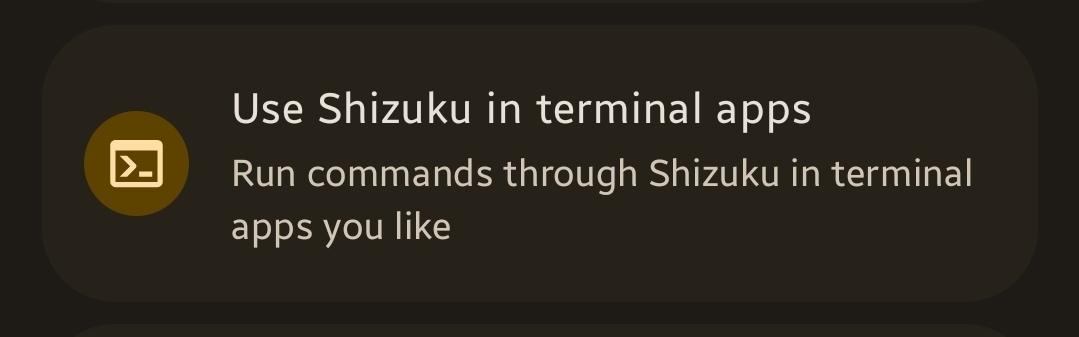
Export it to the "rish-loc" folder we created in the internal storage. Go back to Termux. And run this:
cp -r ~/storage/shared/rish-loc ~/
This copies the exported files to Termux' internal storage. Now, we need to edit the rish file to allow it to work with Termux. Run:
nano ~/rish-loc/rish
You will see a line, looking like this, towards the end:
[ -z "$RISH_APPLICATION_ID" ] && export RISH_APPLICATION_ID="PKG"
Replace the PKG in quotes with com.termux, resulting in:
[ -z "$RISH_APPLICATION_ID" ] && export RISH_APPLICATION_ID="com.termux"
Save and quit(CTRL+X, Y, Enter).
Now, let's actually get into Shizuku's elevated rish shell. Run:
cd ~/rish-loc && sh rish
This will give you a popup from Shizuku asking if you want to allow Termux to use elevation. Allow it. Now we are in Shizuku's elevated shell and can copy content easily, skipping Android 11+'s SAF limits that ZArchiver faces with. To copy the whole RR3 data folder we have in downloads to the proper location, run:
cp -r /sdcard/Download/com.ea.games.r3_row /sdcard/Android/data/
Do not type com.ea.games.r3_row at the second argument. You're copying an entire folder. Typing it would mean having nested folders(/sdcard/Android/data/com.ea.games.r3_row/com.ea.games.r3_row). And wait until it stops without any output. Yes, this is normal. It won't show you a progress bar. This should take from 5 minutes to 30 depending on the device.
And that's it, you copied the data folder using Termux instead of ZArchiver.